- You can setup self managed k8s cluster by following steps below
- or just use
digital oceanoraws EKS, they will setup cluster for you - good luck!
System Prerequisites
- Disable swap
fish
sudo swapoff -a- Disable from fstab line with swap partition,
add # at start
fish
sudo sed -i '/ swap / s/^/#/' /etc/fstab- Configure kernel modules and networking
fish
cat <<EOF | sudo tee /etc/modules-load.d/containerd.conf
overlay
br_netfilter
EOF

sudo modprobe overlay
sudo modprobe br_netfilter

cat <<EOF | sudo tee /etc/sysctl.d/99-kubernetes-cri.conf
net.bridge.bridge-nf-call-iptables = 1
net.ipv4.ip_forward = 1
net.bridge.bridge-nf-call-ip6tables = 1
EOF

sudo sysctl --system
Install containerd (Ubuntu)
- https://docs.docker.com/engine/install/ubuntu
- follow steps in docs and install it
fish
sudo apt-get install containerd.io- generate default containerd config, open it and follow these steps
fish
sudo mkdir -p /etc/containerd
sudo containerd config default | sudo tee /etc/containerd/config.toml

vim /etc/containerd/config.toml
Install kubeadm, kubelet and kubectl
Note
all those steps before, you need to do also for worker nodes
init cluster
it will print some instructions to run
fish
sudo kubeadm init --pod-network-cidr=10.244.0.0/16 --skip-phases=addon/kube-proxyInstall cilium with helm
- follow these steps
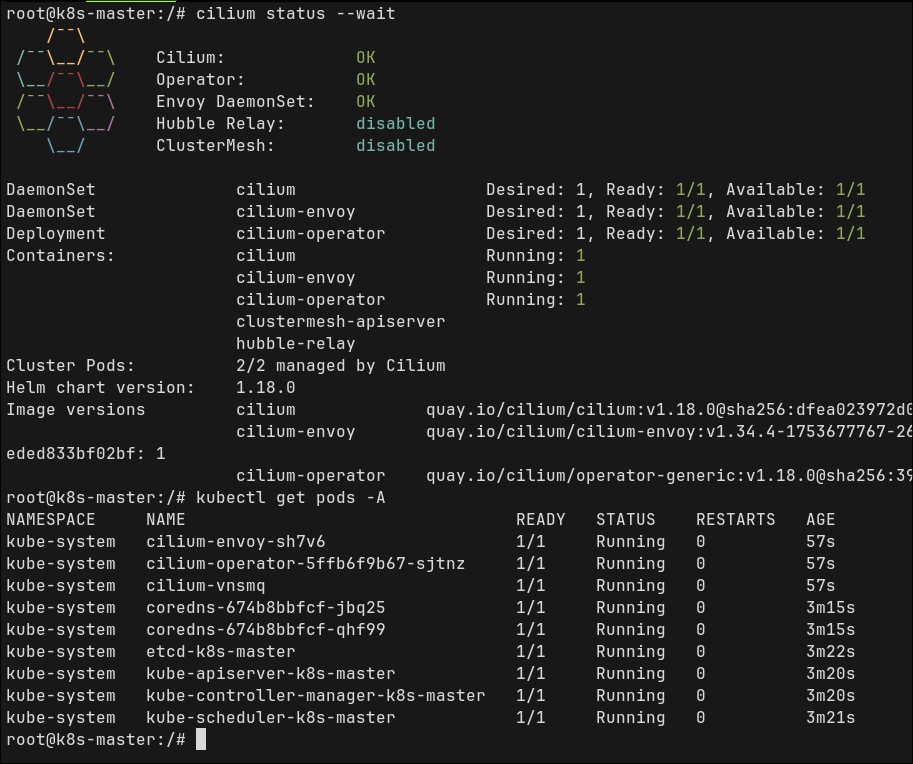
- after that, install cilium cli and wait for status validation
fish
cilium status --waitCheck if k8s master node correctly configured
fish
nc 127.0.0.1 6443 -zv -w 2

kubectl get pods -A- first command should print something like
Connection to 127.0.0.1 6443 port [tcp/*] succeeded!- for second one everything should be in
Runningstatus